

We understand that plans can change, and you may need to modify your credential evaluation order after submitting your application. However, it’s important to know that you can request changes to your application for a limited time only. You can add or remove a credential at no additional cost up until our evaluators have received, reviewed, and accepted all your documents.
If you would like to add or remove a credential after your documents are accepted, you will need to order an upgrade. Note that you must wait until your initial evaluation is complete before submitting an upgrade order.
WES charges per application rather than for each individual credential you wish to have evaluated. For this reason, we highly recommend adding all your credentials to your initial application. This can save you time and the cost of ordering another evaluation in the future.
To get started with adding or removing a credential, you will need to send a request to our Customer Service team.
How to Add or Remove a Credential
Step 1: Log in to your account. On the Account Timeline page, navigate to the Help Widget on the lower right of your account dashboard to make the request.
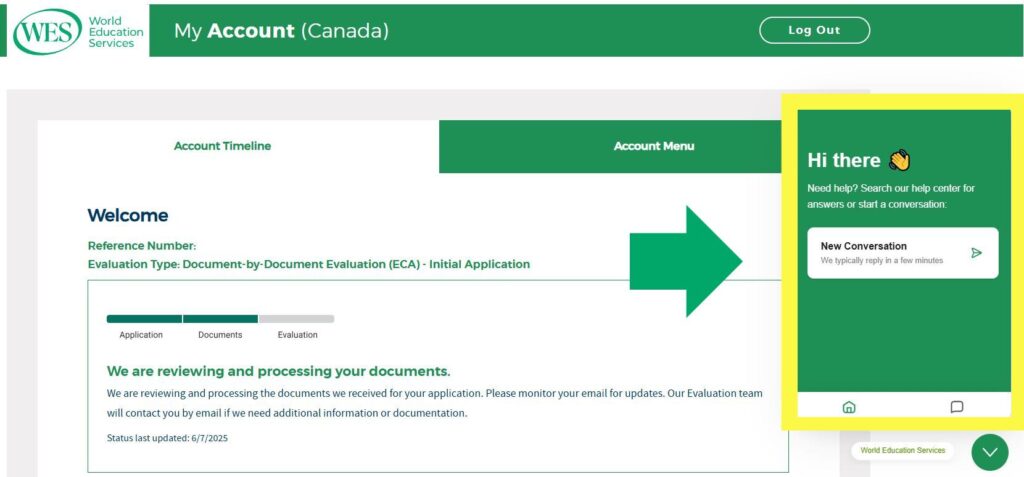
To ensure that we can efficiently complete your request and update your application, please include the following details about the credential you wish to add or remove:
- Your country or territory of education
- The name of the credential you would like to add or remove
- The name of the institution or authority that awarded the credential
- Years of program participation
- Year the credential was awarded
Step 2: Next, you’ll receive an email from our team confirming that we have received your request and that it has been forwarded to the appropriate department for review.
Step 3: A case specialist will review your request and determine whether we can add or remove the credential from your order. The credential may be needed in order for WES to produce a more accurate and complete evaluation. In that case, it will not be removed from the order.
Step 4: One of our staff members will respond to your message by email to let you know whether the credential can be added or removed from your application. Please monitor your email for updates and next steps.
What other changes can I make to my evaluation order?
While the process described above requires assistance from our team, you can easily modify your order in other ways via your WES account:
- Upgrade your package: Switch from the basic package to ICAP evaluation, which includes delivery of your verified transcripts to your selected recipients and storage for future use.
- Add recipients: Select additional schools, employers, or licensing institutions to receive a copy of your credential evaluation.
- Change delivery options: Update how your report is delivered. (Note: Some recipients have a pre-selected method for how reports are delivered to their institutions.)
- Order additional copies and sealed envelopes: Request extra copies of your evaluation report and sealed envelopes for future recipients or your personal records.
Next Steps
Looking for more details about your order? Log in to your WES account anytime to check the status of your evaluation. For more information about credential evaluation, we recommend that you explore our blog, newsletters, tools, and FAQs.

Want to stay in the loop?
Sign up for our Newsletter. We’ll share updates, what we’re learning, and opportunities through our email list.